Click a box on the map. Each panel says what that part of the network does, what runs there, and what changed on it during the project. The URL updates, so a panel can be linked to.
🧱 pfSense
What it does
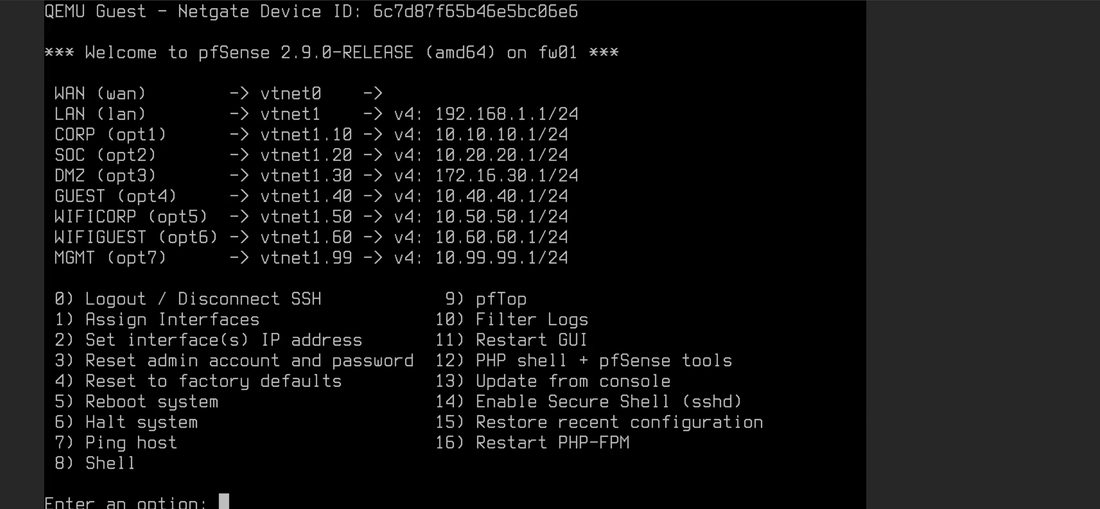
pfSense sits at the centre as firewall and router, segmenting nine zones: router-on-a-stick, with Proxmox's VLAN-aware bridge handling trunking. Explicit deny rules enforce isolation between zones that should never touch, and every block is logged. Segmentation was designed around aliases, not one-off rules, so the deny policy could be reasoned about and audited as a whole.
What runs here
- Routing, NAT, Suricata IDS/IPS, OpenVPN and a Squid proxy, per the design.
- DHCP on each zone, a mix of dynamic leases and static mappings, so known infrastructure (the SOC tooling, the DMZ target) always comes up on a predictable address.
What changed during the project
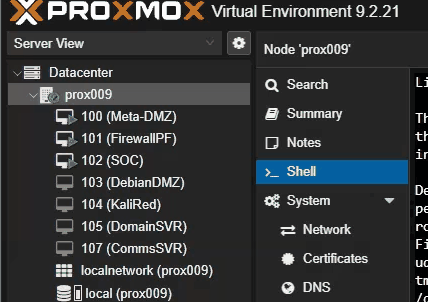
- A full backup and disaster-recovery workflow, using Proxmox's own vzdump with ZSTD compression and a keep-daily-3 retention policy across all seven project VMs, plus a genuinely off-host backup and a timed restore-and-boot test: about 2 min 10 sec measured RTO, well inside the 1-hour target, verified by a before/after diff of the web page and database row count.
- Availability is documented as a known limitation with a stated mitigation: fw01 and the Proxmox host are single points of failure, and pfSense HA (CARP) was not built.
- A shared lab host with SSH root login centrally locked down by policy needed a clean, self-removing workaround to get a backup archive genuinely off the host, rather than weakening the host's own controls.
🔐 Remote access
What it does
Remote access runs through OpenVPN on pfSense with FreeRADIUS authentication against Active Directory, tunnelling clients onto a dedicated 10.200.0.0/24 network that reaches the SOC segment only, not CORP, not DMZ, with the option to layer TOTP or privacyIDEA for MFA. RADIUS group membership, not just a valid login, determines which internal segments a VPN client can actually reach.
What runs here
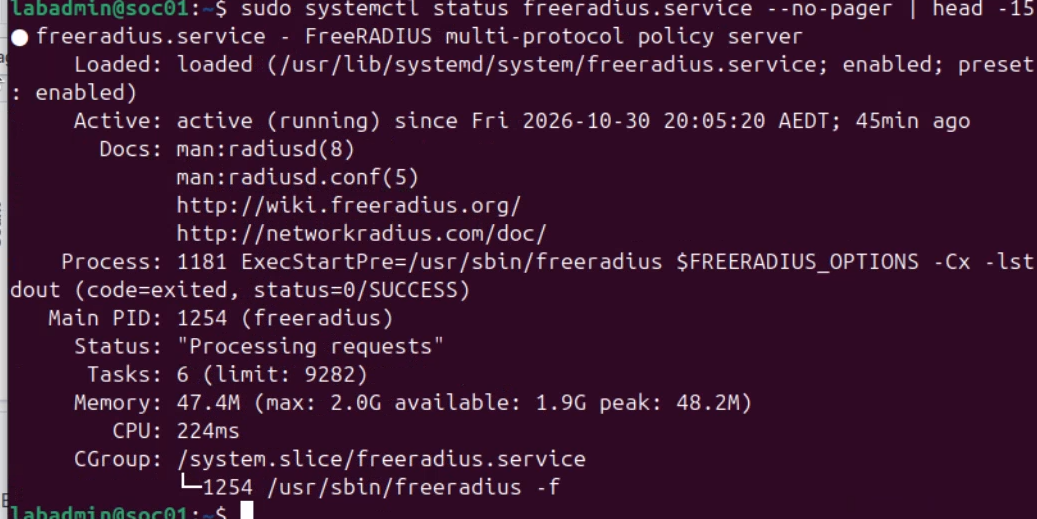
- FreeRADIUS on soc01, authenticating against Active Directory (AAA via AD).
What changed during the project
- Proven live both ways: a member of the right group authenticates and is accepted, while an otherwise-valid account with no group membership is rejected at the same test.
- Confirmed again from the command line with radtest against the live FreeRADIUS service: a correct password gets Access-Accept, a deliberately wrong one gets Access-Reject.
- An earlier pass failed outright with no response from the server at all, traced back through the LDAP bind chain and fixed. The bind chain took several more passes before it held up to a repeated test, not just a lucky first pass.
🛰 Detection
What it does
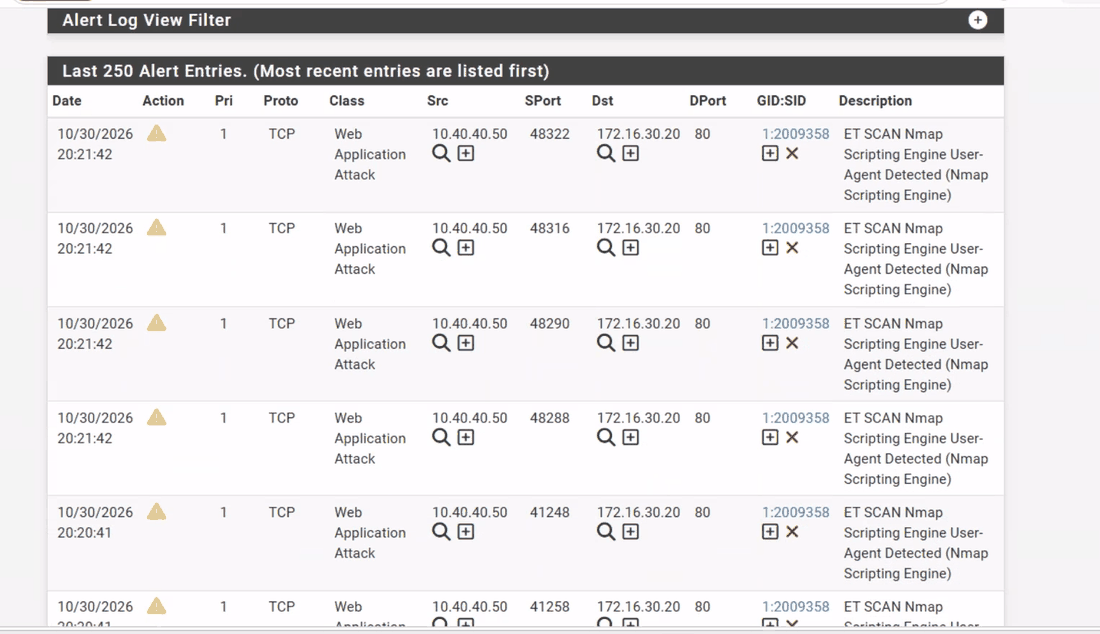
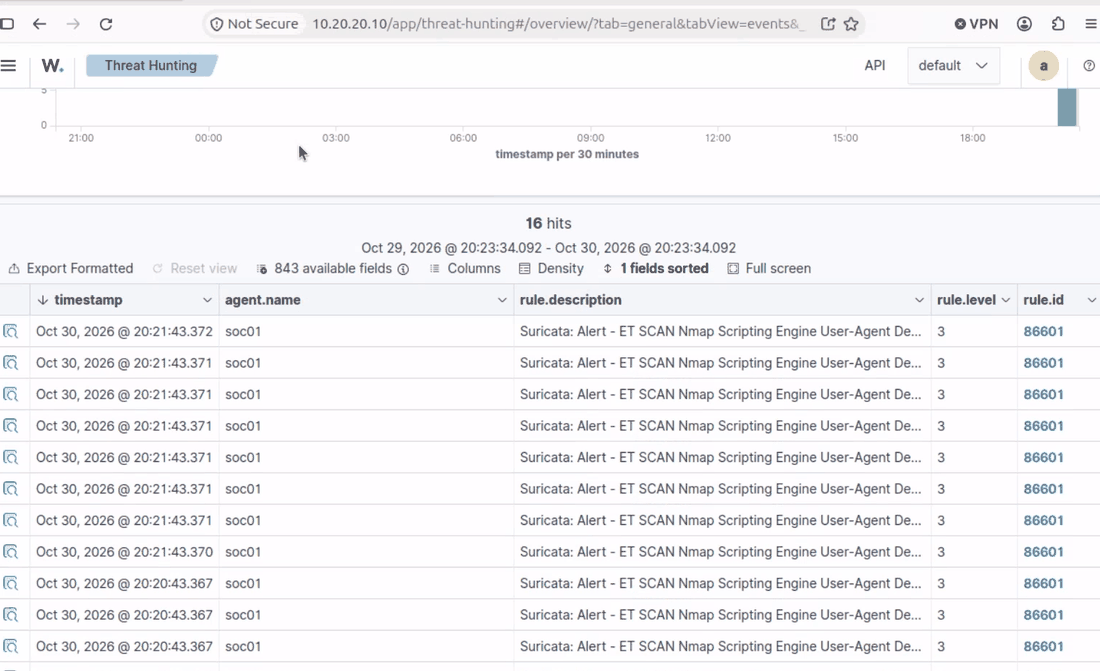
Two independent views of the same activity: Suricata IDS on the GUEST, DMZ and CORP segments, correlated against Wazuh on the SOC segment.
What runs here
- Suricata in detection-only mode for rounds 1 to 3; round 4 was dedicated purely to validating blocking behaviour.
- Wazuh with EDR agents, and syslog-ng collecting logs, on soc01.
- Suricata's log browser, used throughout the exercise to pull logs per instance for correlation.
What changed during the project
- A detection-pipeline gap between SOC's log forwarding and Wazuh was found, corrected, and validated by forcing a fresh alert through end to end.
- Round 3 found a genuine gap: the generic Suricata ruleset did not alert on a boolean-based SQL injection payload at all. It was caught only via the database's own query log, and the gap and its incident-response steps went into the blue-team playbook.
- A domain controller's clock had drifted out of sync with the rest of the environment, quietly breaking Kerberos and skewing event timestamps across the SOC's correlated view until it was corrected.
- A SOC log listener that had silently stopped was found, brought back up under a fresh process, and confirmed receiving events again.
WAN vtnet0 · DHCP from NetLab POD
What it does
The firewall's uplink, taking its address by DHCP from the campus NetLab pod.
What changed during the project
- A campus WAN outage knocked out DHCP mid-project. It was isolated by capturing traffic on the WAN interface itself and watching repeated, unanswered DHCP requests go nowhere, confirming the fault sat upstream of pfSense rather than in the lab's own config.
LAN 192.168.1.1/24 · vtnet1
What it does
The firewall's base internal interface on vtnet1, the 802.1Q trunk into the Proxmox bridge vmbr1, which is VLAN-aware and has no IP address. The seven VLANs from CORP to MGMT are tagged on it.
What changed during the project
Nothing beyond its place in the design is recorded for this zone.
CORP VLAN 10 · 10.10.10.0/24
What it does
The corporate LAN: Active Directory, DNS and the certificate authority on DC01, plus domain workstations.
In the design
Internal business users and directory services.
What runs here
- DC01-AD-DS-CA — AD · DNS · CA
- PC-CORP2 — domain workstation
- comms01 — InspIRCd chat
- Suricata IDS, detection-only until round 4.
What changed during the project
- The domain controller's clock drifted out of sync with the rest of the environment, quietly breaking Kerberos and skewing event timestamps across the SOC's correlated view until it was corrected.
- Not reachable over the VPN: the tunnel network reaches SOC only.
Blue Team / SOC VLAN 20 · 10.20.20.0/24
What it does
The Blue Team SOC segment, which receives logs, alerts and detection evidence. Red Team to Blue Team direct access is denied both ways and logged, and GUEST can never reach it.
In the design
Detect → triage → contain → eradicate → recover.
What runs here
- soc01 — Ubuntu VM
- SIEM-Wazuh — + EDR agents
- SYSLOG-ng — log collection
- RADIUS-FreeRADIUS — AAA via AD
What changed during the project
- A detection-pipeline gap between SOC's log forwarding and Wazuh was found, corrected, and validated by forcing a fresh alert through end to end.
- A SOC log listener that had silently stopped was found, brought back up under a fresh process, and confirmed receiving events again before being signed off as resolved.
- The only segment the VPN tunnel network reaches.
MGMT VLAN 99 · 10.99.99.0/24
What it does
A locked-down management plane reserved purely for firewall administration during the build. GUEST can never reach it.
In the design
Firewall administration only.
What runs here
- Admin workstation — during build only
What changed during the project
Nothing beyond its place in the design is recorded for this zone.
DMZ VLAN 30 · 172.16.30.0/24
What it does
The public-facing DMZ, reachable only per firewall policy and published services, and where the targets of the exercise lived.
In the design
Public-facing and monitored services.
What runs here
- dmz01 — Debian VM
- WEB-Apache — + Flask app
- DB-MariaDB — least privilege
- VM 100 — Metasploitable target
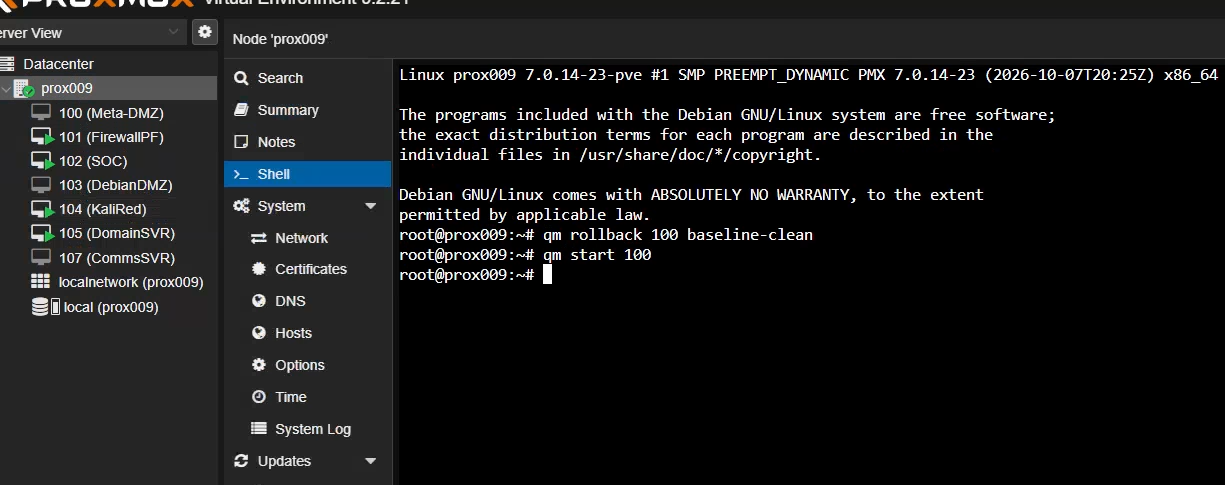
- VM 100, a Metasploitable-based target with a clean-baseline snapshot, taken and verified by hand before the first round and rolled back between rounds.
- A custom PHP and MariaDB web application, deliberately built with a SQL injection flaw.
- Suricata IDS, detection-only until round 4.
What changed during the project
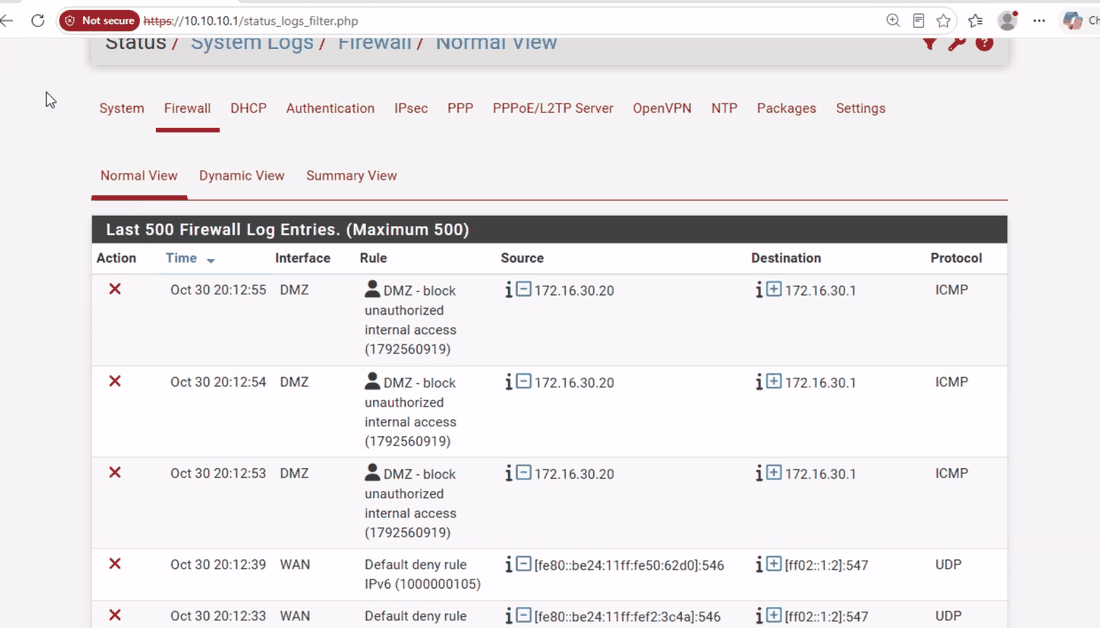
- Zone isolation evidenced: a disallowed cross-zone request, blocked and logged with rule name and timestamp rather than silently dropped.
- Round 3's boolean-based SQL injection went unseen by the generic Suricata ruleset and was caught only in the database's own query log.
- The SQL injection surface was later expanded beyond the single boolean bypass into a full UNION-based extraction chain across three differently-shaped tables.
- While reviewing the app's setup, a stale reverse-proxy configuration turned up, routing requests to a service that no longer matched the current deployment.
Red Team / Guest VLAN 40 · 10.40.40.0/24
What it does
Red Team operates from VLAN 40 in a controlled, lab-safe manner. Red Team to Blue Team direct access is denied both ways and logged, and GUEST can never reach SOC or MGMT.
In the design
Lab-safe actions only: segment-local scanning, credential guessing against a test account with lockout, benign file drop, attempted access from a disallowed zone.
What runs here
- KALI-RED — attack box
- Suricata IDS, detection-only until round 4.
What changed during the project
- The zone's rule set was explicitly tightened to deny reach into the protected internal networks, verified by comparing the rule set before and after the change took effect.
- Round 2: Kali tried to reach a protected internal host directly and was explicitly blocked and logged by the firewall, with the rule name and timestamp captured, rather than silently dropped.
WiFi-CORP VLAN 50 · 10.50.50.0/24
What it does
Corporate wifi, in the design as its own segment. A design placeholder, with no devices configured.
In the design
Design placeholder · no devices configured.
What changed during the project
Nothing beyond its place in the design is recorded for this zone.
WiFi-Guest VLAN 60 · 10.60.60.0/24
What it does
Guest wifi, in the design as its own segment. A design placeholder, with no devices configured.
In the design
Design placeholder · no devices configured.
What changed during the project
Nothing beyond its place in the design is recorded for this zone.
7 pages. The live attack and defence rounds are page 5:
Project overview
PEAS SOC is a nine-zone enterprise network I designed and built from scratch in a Proxmox lab environment for a TAFE group project (CL5, “Build and Battle”), then led the live attack-and-defence exercise against. As team lead, I coordinated the planning, built the core infrastructure, and ran blue-team detection across the exercise.
Pre-planning and design decisions
Before any build work, the group worked through the network’s zone design and threat model together: which segments a real business would realistically need — a corporate LAN, a dedicated SOC analyst segment, a public-facing DMZ, guest wifi, and a locked-down management plane — and, just as importantly, which of those should never be allowed to talk to each other directly.
Role and round planning were revisited mid-project too. The group initially scoped a five-round attack/defence exercise with rotating attacker/defender roles each round. Once the blue/red split was finalised, we deliberately cut this back to four rounds with fixed roles, each targeting a different stage of the kill chain — a scoping decision made to keep the exercise focused rather than repetitive, and to give red team more depth per round instead of breadth.
Network architecture
pfSense sits at the centre as firewall and router, segmenting nine zones: WAN, LAN, CORP, SOC, DMZ, GUEST, WIFICORP, WIFIGUEST, and a locked-down MGMT plane reserved purely for firewall administration. Explicit deny rules enforce isolation between zones that should never touch (GUEST can never reach SOC or MGMT), and every block is logged.
Remote access runs through OpenVPN with FreeRADIUS authentication, where RADIUS group membership — not just a valid login — determines which internal segments a VPN client can actually reach. This was proven live both ways: a member of the right group authenticated and was accepted, while an otherwise-valid account with no group membership was correctly rejected. The VPN’s tunnel network reaches the SOC segment only — not CORP, not DMZ.
What was built
- A Metasploitable-based target VM (VM 100) with a clean-baseline snapshot workflow, rolled back between rounds so every exercise starts from a known, identical state.
- A custom DMZ web application (PHP + MariaDB) deliberately built with a SQL injection flaw, later expanded with additional database tables to support a full UNION-based extraction chain rather than a single canned exploit — giving red team column-count discovery, padding technique, and multiple targets of different shapes to work through.
- Suricata IDS deployed across GUEST, DMZ and CORP, run in detection-only mode for the first three rounds, with round four dedicated purely to validating blocking behaviour.
- A full backup and disaster-recovery workflow for the firewall, including a genuinely off-host backup and a timed restore-and-boot test to produce real, measured recovery figures rather than estimates (~2 min 10 sec measured RTO, well inside the 1-hour target).
Attack and defence rounds
The live exercise ran as four fixed-role rounds, each with its own focus:
| Round | Focus | Defenders | Attackers |
|---|---|---|---|
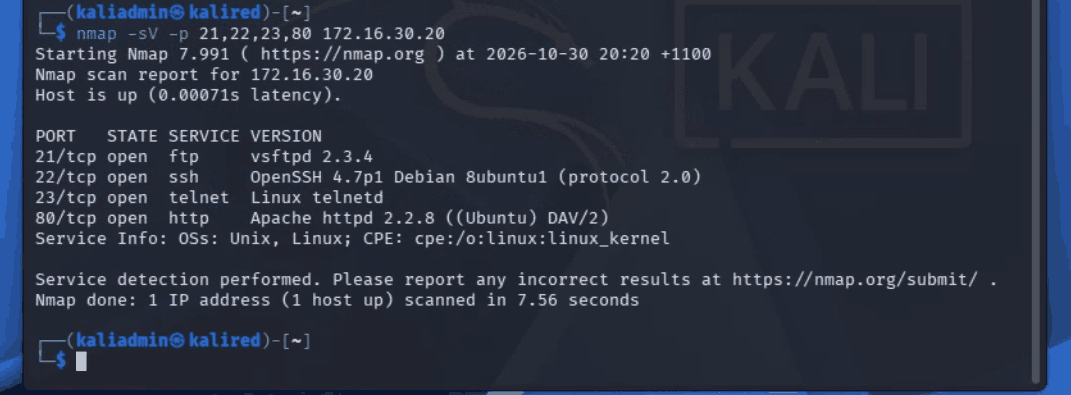
| 1 | Reconnaissance & enumeration — Nmap scan, service/version scan | Fixed blue team | Fixed red team |
| 2 | Credential & service exploitation — brute force, FTP backdoor trigger | Fixed blue team | Fixed red team |
| 3 | Web application SQL injection — boolean bypass + UNION-based extraction chain | Fixed blue team | Fixed red team |
| 4 | Blocking-mode validation — Suricata blocking enabled, SYN flood test case | Fixed blue team | Fixed red team |
Round 1 reconnaissance, picked up and correctly attributed:
Zone isolation enforced and evidenced — a disallowed cross-zone request, blocked and logged rather than silently dropped:
Suricata alerting on the DMZ segment during the exercise:
…correlated against Wazuh for a second, independent view of the same activity:
Between every round, VM 100 is rolled back to its clean baseline so each round starts identical:
For round 3, a genuine detection gap was found and documented rather than hidden: the generic Suricata ruleset did not alert on a boolean-based SQL injection payload at all — it was caught only via the database’s own query log. The baseline, confirmed working before any injection attempt:
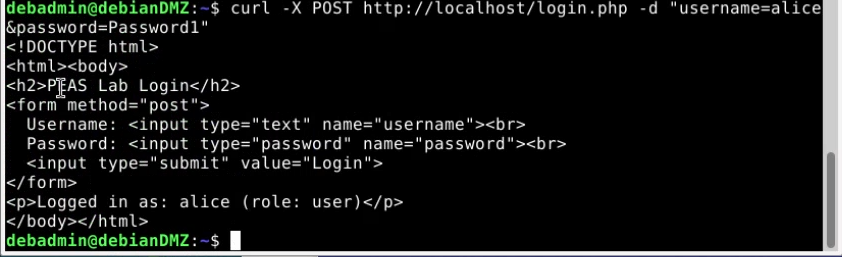
That gap, and the incident-response steps the blue team documented for it (detect, contain, eradicate, recover, lessons learned), fed directly into the project’s blue-team playbook as a reference for future rounds.
Troubleshooting and validation
Real infrastructure means real problems, found and fixed rather than designed away:
- A campus WAN outage knocked out DHCP mid-project and had to be isolated and escalated before VPN testing could continue.
- VPN authentication failures needed careful isolation between genuine backend/config issues and simple operator error — both occurred, and both had to be distinguished before either could be called “fixed.”
- A detection-pipeline gap between SOC’s log forwarding and Wazuh was found, corrected, and then validated by forcing a fresh alert through end-to-end:
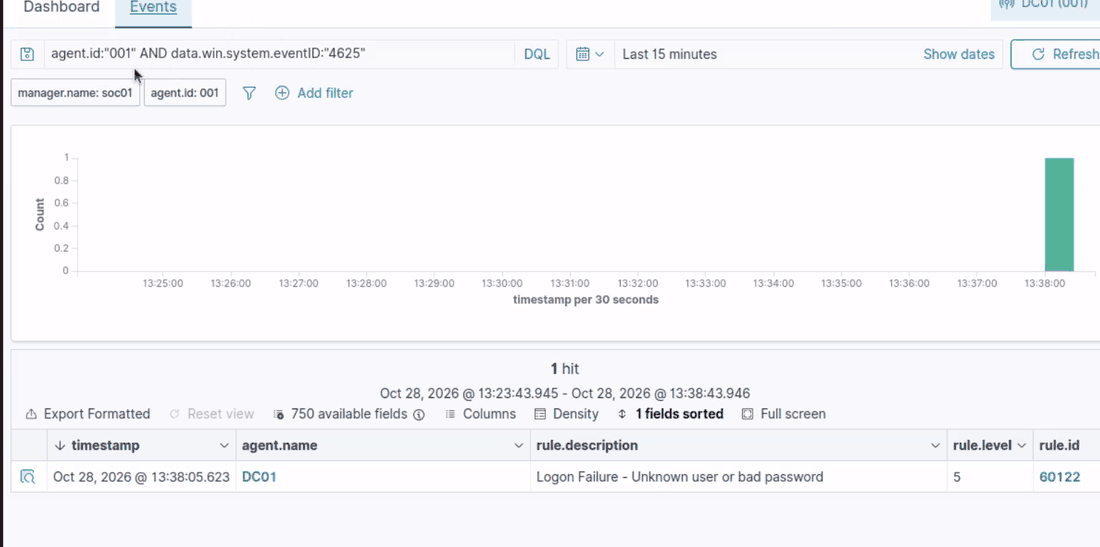
- A shared lab host with SSH root login centrally locked down by policy needed a clean, self-removing workaround to get a backup archive genuinely off the host — rather than weakening the host’s own security controls to make the job easier.
Outcomes and lessons
The project produced more than a working network: a measured, evidenced disaster-recovery figure instead of a guess; a documented detection gap with a real incident-response write-up attached to it, not just a “todo”; and a round structure that was deliberately simplified once the team had enough information to know five rounds added repetition, not depth. The blue-team playbook and group report both carry this evidence forward as the project’s record of what was actually tested and proven, not just planned.