A flat network trusts every device on it equally. A smart plug, a guest’s phone, and the machine holding my important data all share one space — so if any one of them is compromised, the attacker can reach the rest. Network segmentation breaks that flat space into separate zones and controls what may cross between them, shrinking the blast radius of any single compromise.
I wanted to build that properly — VLANs and a firewall — on VMware Workstation with pfSense CE, and design three zones at deliberately different trust levels:
- Trusted — full access to the internet, other zones, and firewall administration.
- IoT — internet access only; blocked from other zones and from the firewall’s admin interface.
- Guest — internet access only; blocked from everything internal.
The success criterion wasn’t “the config saved” — it was demonstrable isolation: proving, from inside each zone, exactly what it can and cannot reach. The whole thing was built additively, alongside my existing lab firewall, with nothing torn down.
The constraint: no hardware
VLAN segmentation is normally taught with physical gear: a managed switch that supports 802.1Q tagging, a router or firewall that can do inter-VLAN routing, and cabling between them. I didn’t have a managed switch — so I built the whole thing virtually, and the concepts map across cleanly:
| Physical component | Virtual equivalent |
|---|---|
| Managed switch | A VMware host-only virtual network (the shared “switch fabric”) |
| 802.1Q trunk port | A dedicated virtual trunk NIC on the firewall |
| Router-on-a-stick | pfSense doing routing + firewalling for all VLANs |
| Physical test PCs | One Linux VM that tags itself into each VLAN in turn |
To act as a real client I built a persistent Linux desktop VM (EndeavourOS / KDE) rather than a throwaway live image — a machine I could actually browse and run tools from inside each segment. That turned “did the config apply?” into “can I see the firewall blocking me?”
Architecture
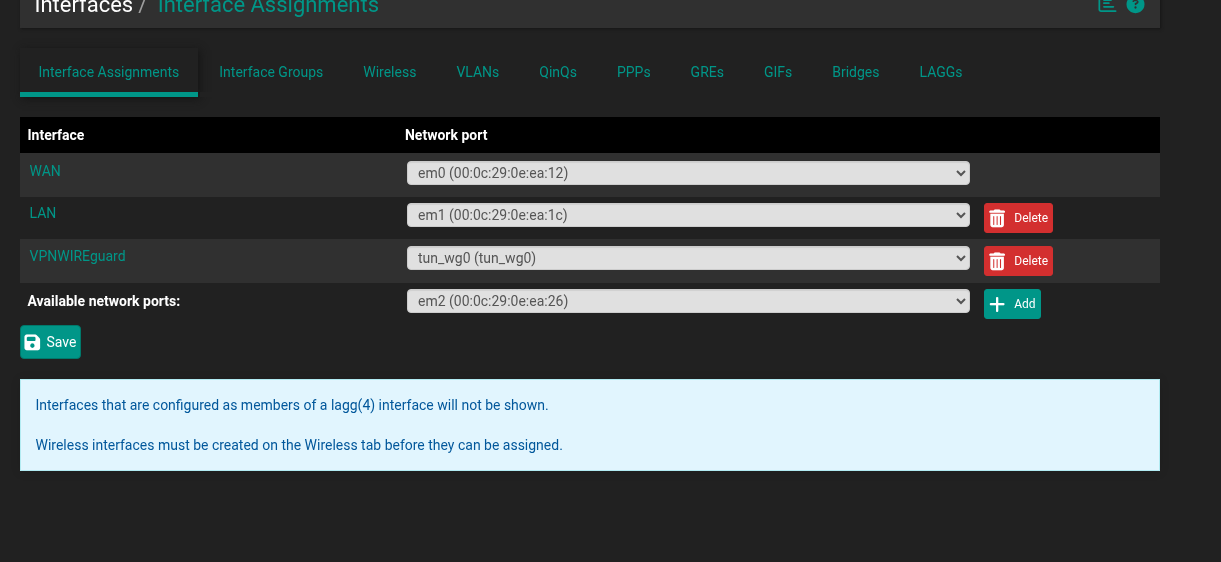
I added a new virtual trunk interface to the firewall and connected it to an isolated host-only virtual network. Three VLANs sit on top of that single trunk, each becoming its own routed sub-interface with its own subnet and DHCP scope:
| VLAN | Zone | Gateway / subnet | Intended access |
|---|---|---|---|
| 10 | Trusted | 10.10.10.1/24 | Full access |
| 20 | IoT | 10.10.20.1/24 | Internet only; no internal, no admin |
| 30 | Guest | 10.10.30.1/24 | Internet only; nothing internal |
The work was strictly additive: the trunk and its VLANs were built alongside the existing firewall setup (WAN, LAN, VPN, and monitoring), which I left completely untouched. I took a configuration backup and a VM snapshot first as a rollback point.
The build
From an empty NIC to three live, addressed segments:
- Snapshot & back up. Firewall config export plus a VM snapshot, so any misstep is reversible.
- Create the virtual switch. An isolated host-only network with its own DHCP server disabled — the firewall, not VMware, hands out addresses on each VLAN.
- Define the VLANs. Three 802.1Q VLANs (tags 10 / 20 / 30) on the trunk NIC.
- Assign & address. Each VLAN promoted to a routed interface with a static gateway IP and a clear name.
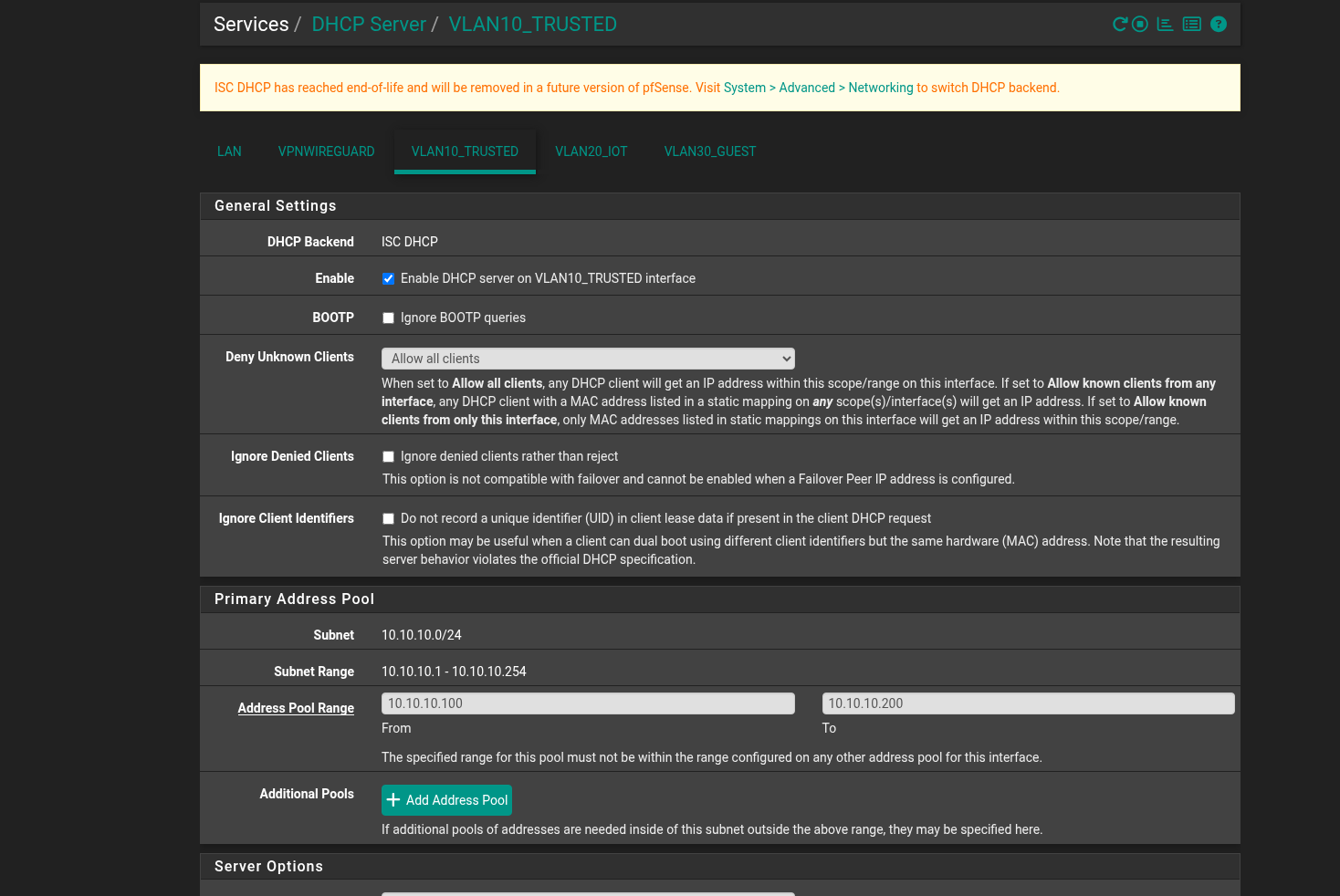
- DHCP scopes. A per-VLAN address pool so clients auto-configure into the right subnet.
- Firewall rules. The rules that turn three open networks into three isolated ones.
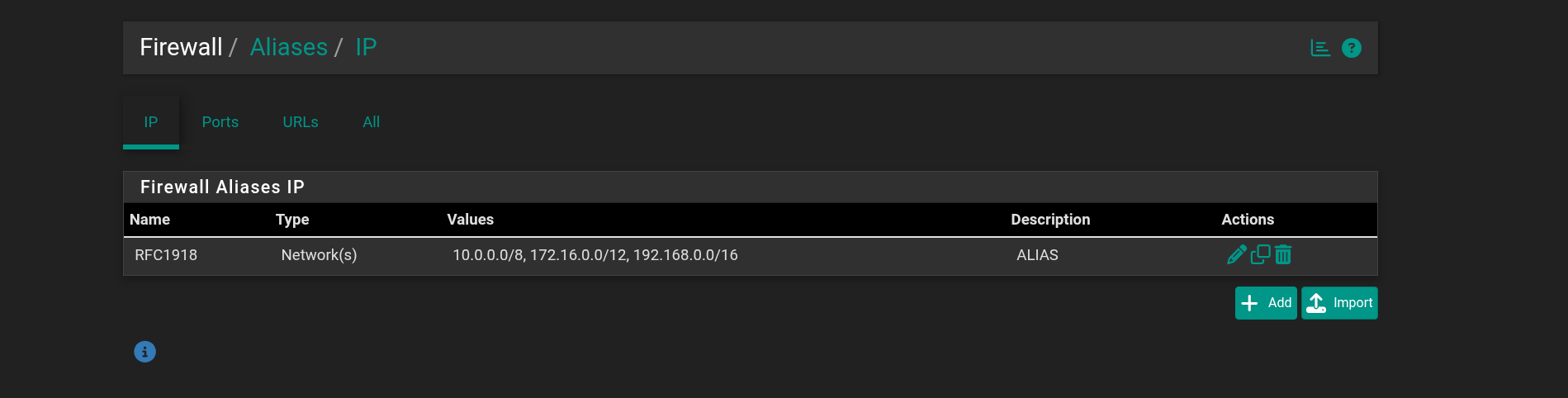
To avoid re-typing subnets in every rule, I created a reusable alias covering all private address space (10.0.0.0/8, 172.16.0.0/12, 192.168.0.0/16). “Block everything internal” then becomes a single, self-documenting rule.
The firewall logic
pfSense evaluates rules top-down, first match wins, and anything not explicitly allowed is denied by default. It’s also stateful — when it permits a connection, the return traffic is allowed automatically. That last point is why a Trusted device can talk to IoT while IoT can’t start a conversation back.
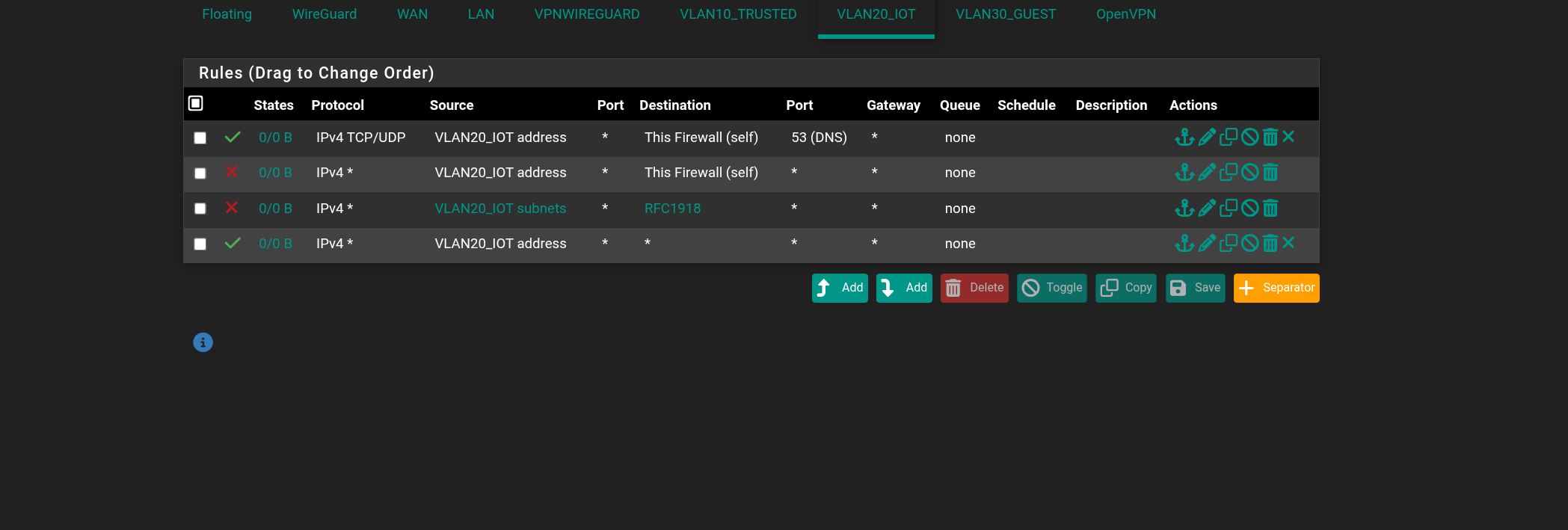
Each restricted zone (IoT, Guest) uses the same four-rule pattern. Order is the whole design:
| # | Action | Destination | What it does |
|---|---|---|---|
| 1 | Pass | firewall :53 | Allow DNS lookups to the firewall |
| 2 | Block | firewall | No access to the admin interface / SSH |
| 3 | Block | RFC1918 | No reaching any other internal zone |
| 4 | Pass | any | Everything left over = the internet |
The DNS rule must sit above the block rules: the DNS server is the firewall itself, which lives inside private space — if the broad “block internal” rule came first, it would swallow DNS and every device would look connected but resolve nothing. Rule 4 needs no explicit “allow internet” target, because by the time a packet reaches it, “internet” is simply everything that wasn’t internal. Trusted, by contrast, gets a single pass any → any rule.
Verification
Same machine, different tag, different access — that asymmetry is the segmentation.
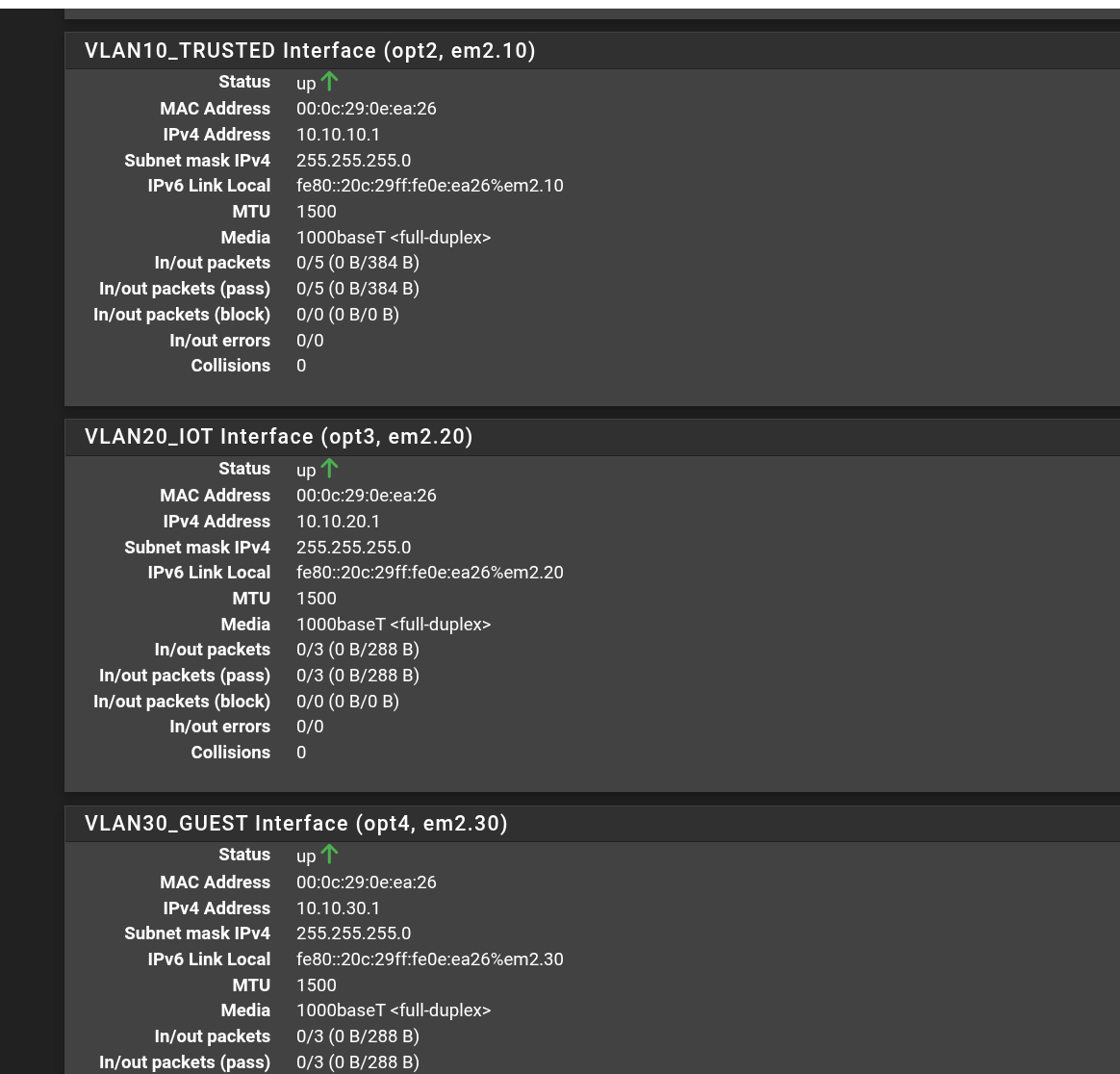
With the firewall built, all three VLAN interfaces came up healthy and addressed:
Trusted (VLAN 10) — full access
I tagged the test client into VLAN 10, pulled a DHCP lease, and every path succeeded:
$ ip -br a show ens33.10
ens33.10@ens33   UP   10.10.10.100/24   fe80::…/64

$ ping -c3 10.10.10.1     # gateway     → 0% loss  ✓
$ ping -c3 1.1.1.1        # internet    → 0% loss  ✓
$ ping -c3 google.com     # DNS         → resolved ✓
$ ping -c3 10.10.20.1     # cross-VLAN  → 0% loss  ✓
The pfSense admin page also loaded in the browser from this zone. Note the cross-VLAN ping to IoT succeeding — that’s Trusted’s allow-any rule at work, and it sets up the contrast for the next test.
IoT (VLAN 20) — internet only
The same client then tagged into VLAN 20. Outbound internet and DNS still worked, but every internal path was refused:
$ ip -br a show ens33.20
ens33.20@ens33   UP   10.10.20.100/24   fe80::…/64

$ ping -c3 1.1.1.1              # internet     → 0% loss  ✓
$ ping -c3 google.com          # DNS          → resolved ✓
$ ping -c3 10.10.10.1          # → Trusted    → 100% loss ✗ blocked
$ ping -c3 10.10.20.1          # own gateway  → 100% loss ✗ blocked
$ browse https://10.10.20.1    # admin        → times out ✗
The gateway-ping failing while the internet still works is expected and correct: pinging the gateway is traffic to the firewall (blocked by rule 2), whereas reaching the internet is traffic through it (allowed by rule 4). A router forwards you; it doesn’t owe you a ping reply.
| Test | Trusted (10) | IoT (20) | Guest (30) |
|---|---|---|---|
| DHCP lease | ✓ | ✓ | configured |
| Internet | ✓ | ✓ | ✓ by rule parity |
| DNS resolution | ✓ | ✓ | ✓ by rule parity |
| Reach another zone | ✓ | ✗ blocked | ✗ blocked |
| Ping own gateway | ✓ | ✗ blocked | ✗ blocked |
| Firewall admin GUI | ✓ | ✗ blocked | ✗ blocked |
Guest (VLAN 30) was built identically to IoT; its behaviour follows from the same ruleset (rule parity).
Troubleshooting — four things that didn’t go to plan
The parts that didn’t go to plan — and how I diagnosed them.
1 · The console wizard trap
Adding the trunk NIC triggered the firewall’s console interface-assignment wizard. That wizard only re-captures the interfaces it can auto-detect — which would have silently dropped my existing VPN interface from the assignment list. I skipped it deliberately and did all interface work in the web GUI instead, keeping the additive promise intact.
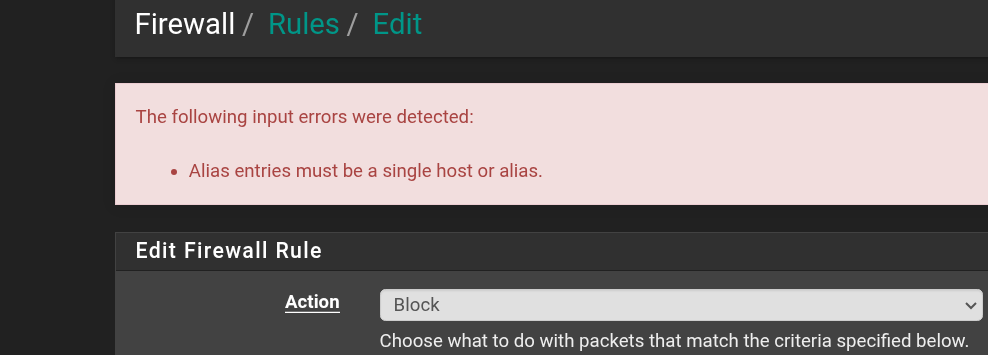
2 · “Alias entries must be a single host or alias”
The private-network alias was rejected when I first used it in a rule, because the destination field was set to Network (which expects a typed subnet) rather than Address or Alias (which accepts an alias name). A one-dropdown fix — but a good reminder that an alias is an object reference, not a subnet literal.
3 · Source: address vs subnets
I initially built several rules with a source of “interface address” (the firewall’s single IP on that VLAN) instead of “interface subnets” (the whole client network). Since client devices never send from the firewall’s own address, those rules matched nothing — which would have made IoT appear dead and left Guest wide open. Correcting every source to the subnet form fixed both at once. Lesson banked: source is almost always the subnet.
4 · The big one: nothing crossed the virtual switch
The hardest problem: with everything apparently configured correctly, the client could not pull a DHCP lease on any VLAN. Rather than guess, I isolated the fault layer by layer:
- Client side: the VLAN sub-interface was up and tagging correctly (confirmed with
ip -d link) — so the client was fine. - Firewall side: all three VLAN interfaces showed up with correct IPs — so the config was fine. But their inbound packet counters read zero: the firewall was hearing nothing.
- Cross-check: even untagged pings across the virtual network failed. When nothing crosses at all — tagged or untagged — the fault is the switch fabric itself, not the VLANs.
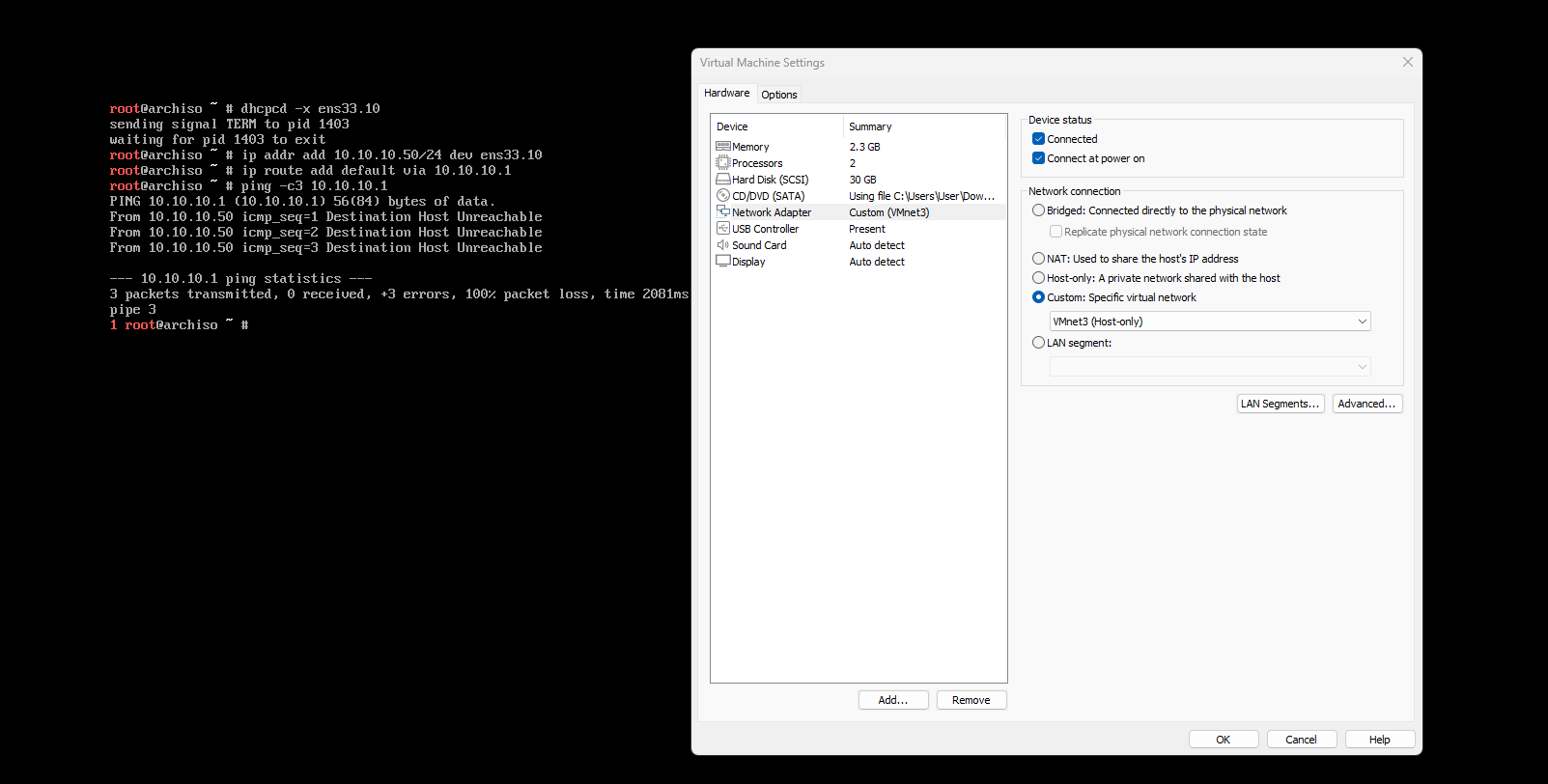
Root cause. I’d opened the VMware Virtual Network Editor in read-only mode. Every earlier “re-apply” of the host-only network looked like it worked, but the
Applybutton was inactive — so the underlying virtual switch was never actually rebuilt. Clicking Change Settings to elevate to admin, then toggling and re-applying the network, rebuilt the switch. The DHCP lease landed on the very next attempt.
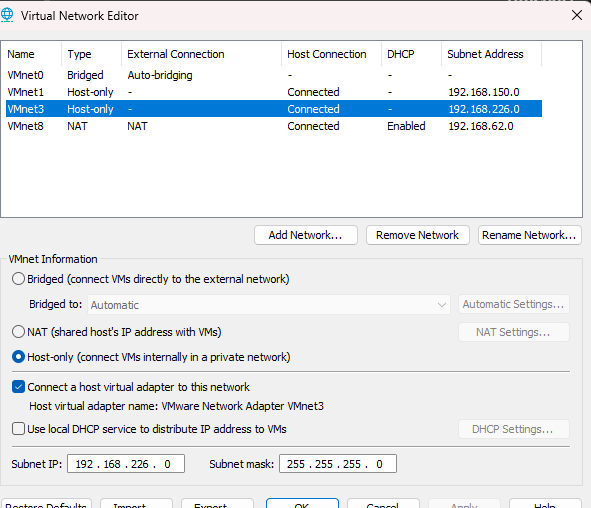
The lesson generalises well beyond this bug: a healthy-looking config on both endpoints doesn’t prove the medium between them works. Testing the untagged path was what pointed past the VLANs to the switch.
Outcome
The finished lab is a firewall enforcing genuine three-way isolation, verifiable on demand: a single client machine can drop onto any zone by changing one VLAN tag and observe exactly the access that zone’s rules permit. Blocked traffic can be watched live in the firewall logs as it’s dropped.
- VLANs & 802.1Q trunking — tagging, a shared trunk, per-VLAN subnets and DHCP.
- Inter-VLAN routing & firewalling — router-on-a-stick with default-deny, stateful, ordered rules.
- Firewall rule design — reusable aliases, DNS-before-block ordering, least-privilege zones.
- Systematic troubleshooting — isolating a fault across client, firewall, and switch layers instead of guessing.
- Virtualisation — recreating a full managed-switch topology, and a real desktop client, with zero physical hardware.
Every concept here — trunking, tagging, inter-VLAN routing, zone-based firewalling — is exactly what runs on physical enterprise gear. The only difference is that the switch, the cabling, and the test PCs were all software. The design, and the isolation it enforces, are the real thing.