I run Claude Code on two machines: the Debian VM in my home lab (always on) and a Debian laptop (sleeps, roams, follows me to campus). I wanted the laptop to push notes, facts, and findings into a central store on the VM — from any network — so the home-lab agent could pick them up later.
Claude Code’s built-in Remote Control turns a second device into a remote window onto one session. That’s not what I wanted. I wanted both machines to stay fully independent agents, linked through a shared tool. So I built a small MCP server on the VM and pointed the laptop’s Claude Code at it: the hub becomes just another tool the laptop can call.
Goals
- Let the laptop’s agent send notes to a central point on the home-lab VM.
- Make it work from any network — home LAN, campus Wi-Fi, hotspot — without opening inbound ports on the home firewall.
- Preserve the VM’s existing pfSense RFC1918 containment.
- Keep the server’s capabilities deliberately narrow.
The moving parts
- MCP (Model Context Protocol) — an open protocol that lets Claude connect to external tools. An MCP server exposes capabilities as “tools”; an MCP client (Claude Code) discovers and invokes them mid-conversation. My hub exposes exactly two:
push_info(write a note) andget_recent(read notes back). - FastMCP (
mcpPython SDK) — builds the server in ~40 lines. - SSE (Server-Sent Events) — the transport. The default
stdiotransport only works for a process on the same machine; SSE runs over HTTP, so a remote machine can connect. - Tailscale — a WireGuard mesh VPN. Every enrolled device gets a permanent
100.x.x.xprivate IP that works identically on any network, and all connections are outbound-only to Tailscale’s coordination servers — so no inbound firewall port is ever opened. - systemd — runs the server as a persistent, auto-restarting service, the same pattern as my other lab daemons.
Build process
Each layer was verified before adding the next.
MCP server on the hub VM. A project directory with a Python venv (Debian blocks system-wide pip) and the
mcpSDK. The FastMCP server exposes the two tools:push_info(source, content)appends a timestamped entry to an append-only JSONL inbox (one JSON object per line, so concurrent writes never clobber each other), andget_recent(n)returns the last n entries. Bound to0.0.0.0:8420— it has to listen on the Tailscale interface, not just localhost — over SSE.Persistence via systemd. A service unit pointing at the venv’s Python and the server script, with
Restart=always, ordered after networking and the Tailscale daemon, thensystemctl enable --now.Mesh VPN with Tailscale. Installed on both machines, enrolled under the same account (same account = same tailnet). The VM’s containment rules needed no changes — Tailscale is outbound-only, matching the existing model. Recorded each machine’s permanent tailnet IP.
Registering the hub with Claude Code. On the laptop:
claude mcp add --transport sse --scope user desktop-hub http://<hub-tailnet-ip>:8420/sse--scope userregisters the server account-wide rather than per-directory. The same command pointed atlocalhoston the VM, so its own Claude Code can read the inbox too.End-to-end verification. A laptop session called
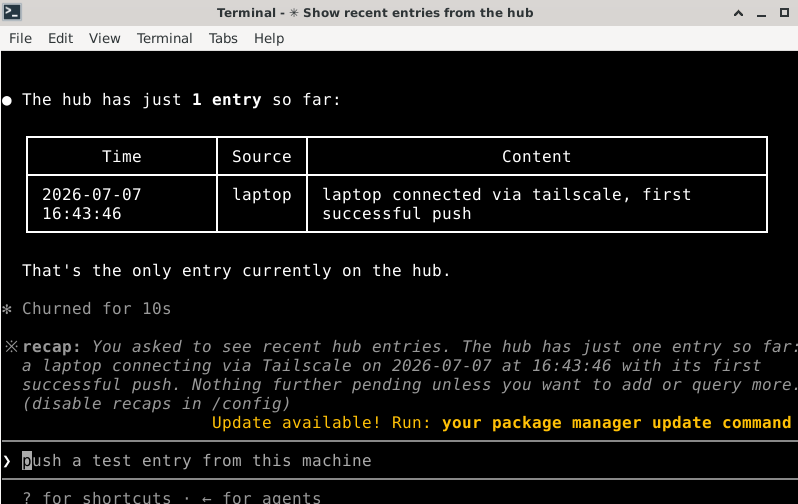
push_infowith a test note; the hub confirmed storage. I verified it on the VM both by reading the inbox file directly and via the VM’s own Claude Code callingget_recent— the screenshot above.
Troubleshooting log
The instructive part:
| Symptom | Root cause | Fix |
|---|---|---|
status=203/EXEC, service died in 34 ms | ExecStart/User= referenced the wrong username and home path — systemd couldn’t find the binary | Corrected the paths, daemon-reload, restart |
| Venv Python “No such file or directory” | python3 -m venv had silently never completed — only server.py existed | Re-ran venv creation (installing python3-venv) and reinstalled the SDK |
| Service still failing after the venv fix | The edited paths hadn’t been saved — status still showed the old ones | Checked the Process: line in systemctl status to spot the stale path; re-edited and restarted |
Tailnet ping 0.05–0.12 ms, but curl returned nothing | I was pinging the laptop’s own tailnet IP (loopback-level latency was the tell), not the VM’s | tailscale status lists every device’s IP — used the VM’s |
| Laptop’s Claude Code couldn’t see the hub | The server was added after the session started (MCP servers load at session start), and default scope is per-directory | Re-added with --scope user, started a fresh session |
| Note “not found” on the VM | I looked for a visible artefact, not the inbox file — and the VM’s Claude Code had no MCP registration (hosting a server ≠ being its client) | Read the JSONL inbox directly; separately registered the hub with the VM’s Claude Code via localhost |
Diagnostics worth keeping: journalctl -u <service> for logs; the Process: line in systemctl status shows the actual command systemd tried; abnormally low ping latency means you’re talking to yourself; and claude mcp list from the shell versus /mcp inside a session are different surfaces.
Security posture
- Minimal tool surface. The hub exposes only note-write and note-read — no shell execution, no arbitrary filesystem access. Every tool on an MCP server is invocable by any connected client, so a generic “run command” tool would turn a compromised client into a remote shell. Capabilities stay deliberately narrow.
- No inbound exposure. Tailscale’s outbound-only model means the home firewall never opens a port; the hub is unreachable from the public internet.
- Containment preserved. The VM’s RFC1918 isolation rules were untouched throughout.
- Input-sanitisation pattern. Any future tool touching the filesystem should strip path components from inputs (
os.path.basename()) to block directory traversal.
Architecture
┌─────────────────────┐         Tailscale mesh          ┌──────────────────────┐
│  Laptop (roaming)   │  ── outbound WireGuard/DERP ──▶ │  Home-lab VM (hub)    │
│  Claude Code agent  │                                 │  behind pfSense       │
│  MCP client         │   http://<tailnet-ip>:8420/sse  │  FastMCP server :8420 │
│                     │  ──── push_info / get_recent ──▶│  inbox.jsonl store    │
└─────────────────────┘                                 └──────────────────────┘
The design is symmetric in principle — the laptop could host and the VM could be the client — but hub-and-spoke was deliberate: the VM is always on, while the laptop sleeps and roams, which makes it a poor server.
Where this goes
The recipe — FastMCP + SSE + Tailscale + systemd — reapplies to any service that needs secure remote reachability without punching holes in the home network. The hub is extensible: new narrowly-scoped tools (constrained file drops, status queries, task queues) are each just a decorated Python function plus a service restart.
Next steps I’ve left open: token-based authentication in front of the server, Tailscale ACLs restricting which devices may reach port 8420, and swapping the JSONL inbox for SQLite if querying needs grow. The theme is the same one running through the whole lab — connect outward to a rendezvous point, keep the capabilities minimal, and never open an inbound door.